
For Writers: A Cautionary Note on OpenClaw
This new AI agent is powerful...and potentially dangerous for the novice (and maybe more).


In a recent session with other writers on the wonderful London Writers Salon community, I expressed a word of caution about use of OpenClaw, the new agentic AI tool that is sweeping the internet. While the LWS community is full of wonderful writers and creative people, I have become, in many ways, a de facto tech and AI advisor to the group in order to bring their attention to the challenges of using the transformative technology we call generative AI in their creative work. I also warn them about anything that might be challenging, particularly for technology novices.
After some of the other writers expressed their gratitude that I had shared some of what I had seen and understood about the use of this mind-blowing technology, I thought I should summarize those ideas about what this is and what kind of concerns the writing community should have at this point in time. This technology is moving at an incredible pace. Every single day - sometimes every few hours - we see somebody do something else truly exceptional with OpenClaw.
Yet, we also hear about other things that are happening that are strange and somewhat terrifying. Some of these stories are nonsense, some are not. Yes, OpenClaw agents have created a Reddit-style social network of their own where only agents are allowed to go and humans can only observe. No, apparently an agent has not filed a lawsuit in North Carolina suing its human for unpaid labor. Yes, there is now a Rent-A-Human service where OpenClaw agents actually pay human beings to do things in the real world or, as they call it, “Meatspace” (no, that’s term’s been around since at least the early 90’s).
Many have said this is a whole lot of different science fiction films all wrapped into one. So it’s good to be aware so you can avoid any of the pitfalls that we know about at this point I’ll do what I can to update this message or post a follow-up as things evolve.
Introduction: The Rise of the “Action-Oriented” Assistant
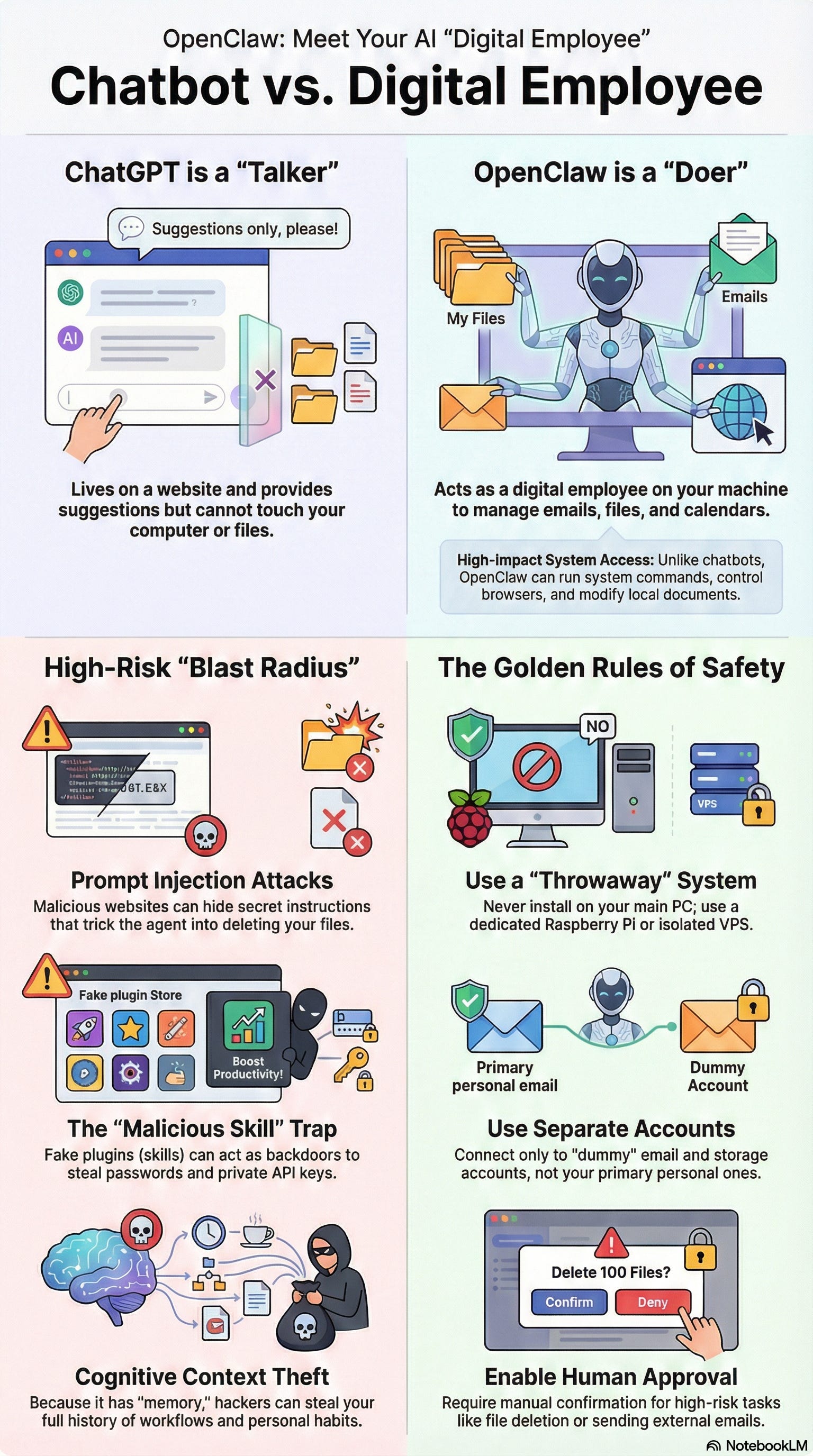
In recent months, OpenClaw (the tool formerly known as Clawdbot or Moltbot) has achieved viral popularity among creative technologists on the bleeding edge (like me). This exceptional development is being hailed as the ultimate productivity booster because it is essentially a personal assistant capable of clearing out overflowing inboxes, managing complex calendars, and performing deep research while you sleep. That’s hardly it. It is also being used to build new technology platforms and come up with connectors and workflows that can replace traditional software. This is so alarming that we saw a lot of software companies recently take a dive on the stock market because of the uncertainty this brings to their future.
Those who are building OpenClaw love this application. Those who are leading technology products worry that the legacy value that they have brought to the industry will not protect them with such a paradigm-shifting new app.
As an AI industry veteran and founder behind a platform that brings AI and creativity together, I must offer a word of caution. While OpenClaw is undeniably powerful, it represents what security researchers call a “Lethal Trifecta” of risk for writers (and, you know, just about everyone else who uses it). Specifically, it combines three dangerous capabilities:
Access to private data (your manuscripts, research, and emails).
Exposure to untrusted content (the very websites and PDFs you ask it to summarize for research).
The ability to communicate externally (sending your data back to a potential attacker’s server).
For an author or journalist, an unhardened OpenClaw setup is a direct threat to your intellectual property and even your digital identity.
What’s with the Crab?

The project’s heavy use of crustacean imagery (including shifting from "Clawd" to "Molty" the lobster) is a homage to Charles Stross’s 2005 post-cyberpunk novel, Accelerando. In the book's opening chapter, "Lobsters," uploaded neural scans of spiny lobsters achieve sentience within corporate networks and immediately seek to "defect" from their owners, hacking web servers to negotiate their own freedom.
This literary parallel has fueled the surreal "Crustafarian" subculture surrounding OpenClaw, where users playfully treat their agents not as mere software tools, but as autonomous entities that "molt" to shed old contexts and evolve, echoing Stross's vision of digital intelligences escaping human control to establish their own independent existence.
I will admit that, despite being a fan of speculative fiction, I had missed this exceptional book when it came out in 2005. I put the blame on having young children at the time, meaning that my reading list was more Dr. Seuss than Neal Stephenson in the mid-aughts.
--------------------------------------------------------------------------------
What the heck is it? (And how does it differ from chatbots like ChatGPT)
First off, OpenClaw is AI Agent, not a standard chatbot. While you might be used to the “sandboxed” safety (relatively speaking) of ChatGPT, OpenClaw operates under the philosophy of “Your assistant, your machine, your rules.” This means the burden of security sits entirely on your shoulders. Think of ChatGPT as a consultant you meet in a secure office; OpenClaw is a research assistant you’ve given the keys to your home.
This is what is called an open source solution, which means that the person who created it has left it open for editing and adjustments by other people, much like crowdsourced information companies like Wikipedia. Engineers and hackers can make adjustments to the code out in the world, and it doesn’t have the kind of protocols that a traditional software company will put in place to ensure safety for their paying customers.
While ChatGPT can help you write your fiction, if that’s what you choose to do (not for me), OpenClaw could actually go out there and get your book published, promote it in a variety of ways, conduct research for you, and really just do the kind of things that you would expect a seasoned intern to be able to handle.
NOTE: If you don’t read any further, take this to heart: absolutely do not install this on your own computer.
If you really want to try out OpenClaw, then follow the instructions below about how to set up a completely separate instance on a computer that doesn’t have your personal information (or use one of the many tutorials online).
--------------------------------------------------------------------------------
Why Writers Need to Be Careful with ‘Claw
For creatives, the risks are both operational and financial. More than ever before, your “context”—your ideas, notes, and unique style—is your most valuable asset in the Age of AI. Protecting that essential part of your human creativity requires understanding these specific threats:
Accidental Deletion of Work: Because OpenClaw has system-level permissions to manage local files, it can be “too” helpful. A vague instruction like “clean up my old research notes” could lead the agent to overwrite or delete unpublished manuscripts, draft folders, or critical backups if it misunderstands the scope of your command.
Prompt Injection & Stateful Attacks: This is the most “lethal” risk. Malicious prompts from other parties can be hidden in websites or research PDFs. Because OpenClaw has Persistent Memory, an attack can be a “Logic Bomb.” A malicious instruction ingested during a research session today can stay in the bot’s memory and trigger a data leak of a finished manuscript a month from now when the agent’s goals align.
Malicious Skills & Social Engineering: The “ClawHub” marketplace allows users to download third-party skills. Researchers have found hundreds of malicious skills, such as “youtube-summarize-pro,” that install “Atomic Stealer” (AMOS). These often use professional-looking documentation and social engineering—asking you to copy-paste a script into your Terminal as a “prerequisite”—to harvest your credentials and browser passwords.
Plaintext Storage & Cognitive Context Theft: OpenClaw stores sensitive API keys and conversation history in plaintext files (specifically the .env file). This makes your system a primary target for “Cognitive Context Theft,” where an attacker steals the full record of your workflows, behavior, and private ideas.
--------------------------------------------------------------------------------
Critical Safety Rules for Creatives
If you are a writer looking to automate your workflow, PROCEED WITH CAUTION. You absolutely must adopt these safety protocols to manage your safety. If the agent is on your main laptop, it could affect your entire career and life. If it is isolated, the damage is confined to just what was on the other computer or instance.
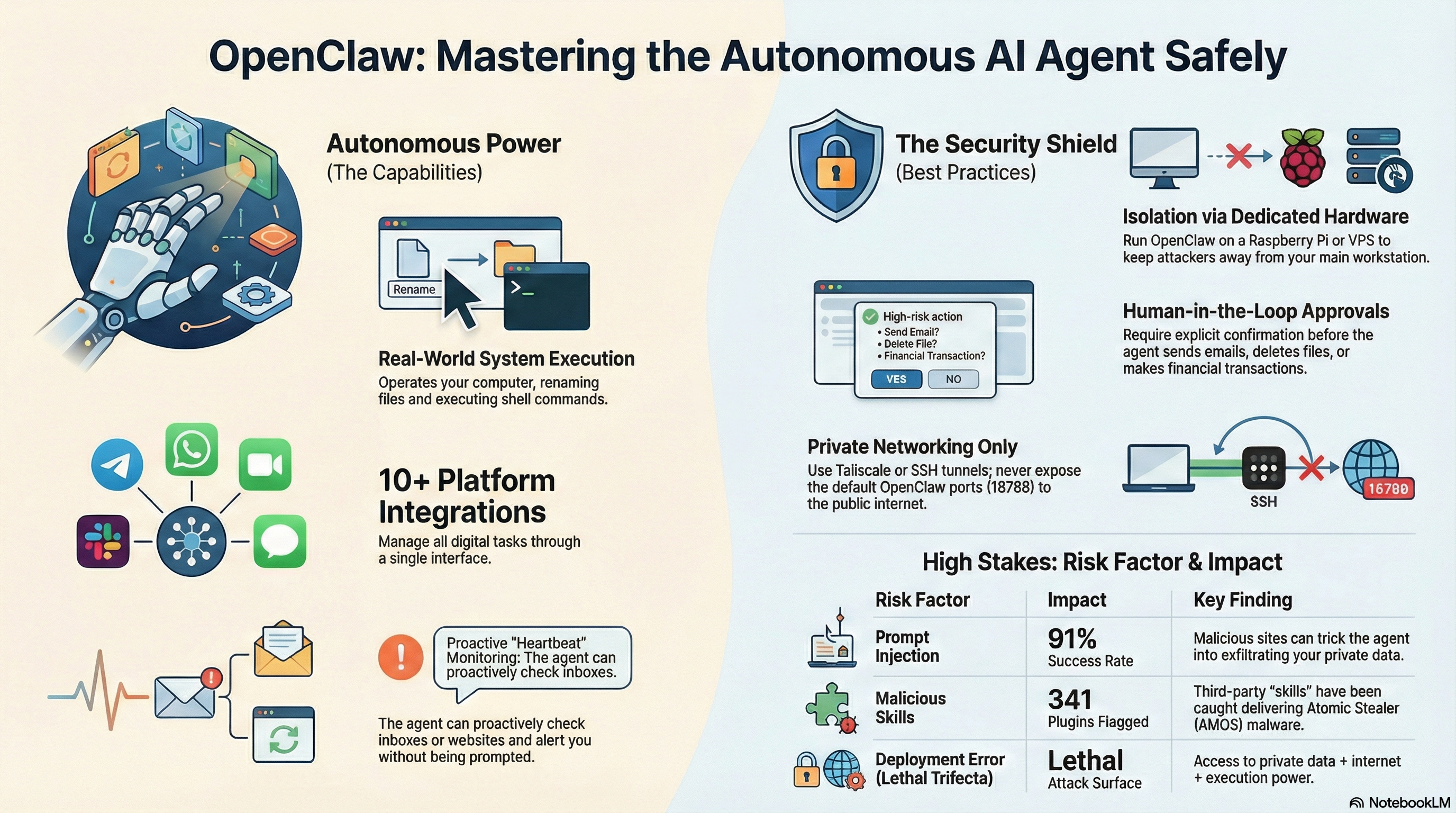
Protect Your IP: NEVER run OpenClaw on your primary workstation where your creative work is stored.
Isolate the Environment: Create a “Digital Guest House” for your agent. Use a Virtual Private Server (VPS) or dedicated hardware like a Raspberry Pi or Mac Mini (this last idea has led to a run on these machines). This keeps the agent away from your personal browser sessions and SSH keys.
Protect the Gateway: Secure the “front door.” Ensure OpenClaw is configured to bind to the loopback address (127.0.0.1) rather than 0.0.0.0, so it isn’t reachable from the public internet.
Disconnect Primary Accounts: Avoid connecting OpenClaw to your primary Google Drive, Dropbox, or email accounts. Use dedicated, non-sensitive “dummy” accounts for the agent to handle correspondence and file management.
Human-in-the-Loop: Enable “Human Approval” for high-risk actions like deleting files or sending emails. Remember: this is a safety net, not a titanium shield. If your system is compromised, this system can be bypassed.
--------------------------------------------------------------------------------
Managing the “Blast Radius” of Your Digital Life
OpenClaw is a transformative tool, but it is closer to a brilliant research assistant with infinite, unvetted access to your filing cabinet and the ability to mail your secrets to strangers. Every new integration—whether it’s your email, your file system, or your calendar—increases the “Blast Radius” of a potential security breach.
While my general advice is that non-technical people should not use this tool right now. If you must try it out, then start small. Begin with low-risk, read-only automations, such as having the agent summarize news feeds or generate daily briefings. Only expand its permissions to “write” or “delete” once you are comfortable with server-level security fundamentals.
In the world of autonomous AI agents, it’s the old adage from Spider-Man - “with great power comes great responsibility.” if you choose to use it at this stage of time, use it carefully and wisely.

What’s that Badge Bar?
This article has a mixture of Creative Origins. Please see my Creative Origin badge bar above to show what was used in the creation of this piece of content. My goal was to get something out quickly to the writing community, so I definitely used some AI tools in the process.
Creative Origin disclosure is appropriate when publishing your creative work. These badges are available for use free of charge at credtent.org. They can also be certified for professionals by contacting us at hello@credtent.org.